Uptime Reboot Policy with NinjaOne and PowerShell

Long-running uptime can be useful, but it also increases risk: pending updates remain pending, patch windows get missed, and users eventually get hit with inconvenient restarts.
This script gives you a practical middle ground:
- Detect when uptime exceeds a threshold
- Notify the logged-in user with a Windows toast
- Optionally let the user schedule an earlier reboot
- Enforce a reboot deadline with a Scheduled Task
- Write policy state and user action back to NinjaOne custom fields
Creating Fields
- Role Custom Fields are custom fields that are specific to a device role.
- Global Custom Fields are custom fields that are applicable to all devices and/or to a location and/or organisation
When you create your custom field you need to make sure that you set the Scripts permission to ensure that you can read or write to the field from your scripts - as appropriate for the script you're using.
This script can run without custom fields, but adding them gives you much better visibility for reporting and follow-up.
| Field Label | Field Name | Field Type | Description |
|---|---|---|---|
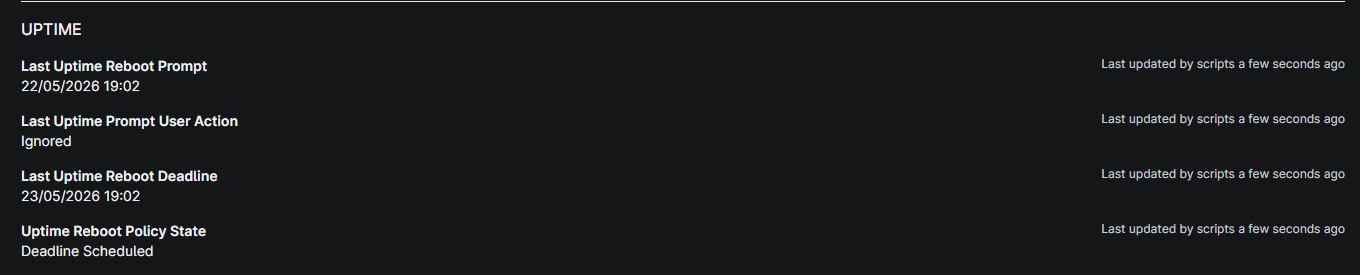
| Last Uptime Reboot Prompt | lastUptimeRebootPrompt | Date/Time | When the user was last prompted. |
| Last Uptime Prompt Action | lastUptimePromptUserAction | Dropdown | Last recorded user action (Rebooted, Scheduled Reboot, Ignored). |
| Last Uptime Reboot Deadline | lastUptimeRebootDeadline | Date/Time | Current enforced reboot deadline from the script. |
| Uptime Reboot Policy State | uptimeRebootPolicyState | Dropdown | Current policy state (Below Threshold, Threshold Exceeded, Prompt Shown, Deadline Scheduled, Cleanup Completed). |

The Script
This script was updated after being published, if you're using it please compare the version you have with the version available here.
This script was last updated on 2026/05/22.
loading...
Script Variables
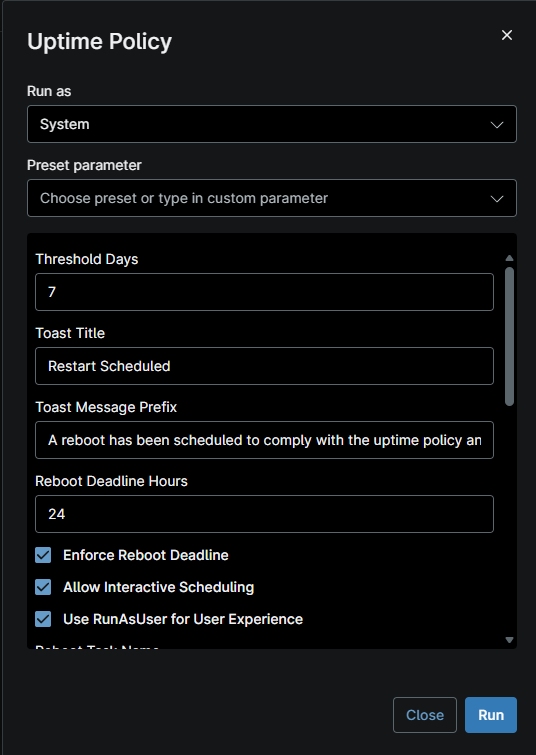
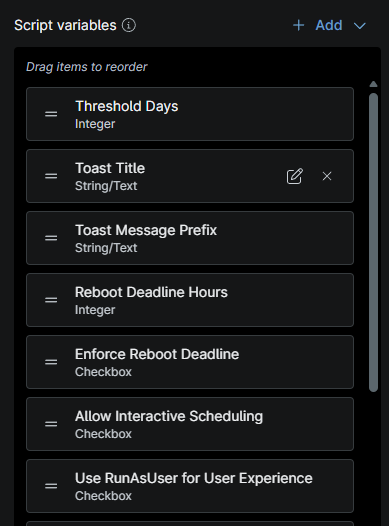
The script has sensible defaults, but these are the key variables to expose in NinjaOne for full control.
| Ninja Variable Name | Type | Default | What it does |
|---|---|---|---|
thresholdDays | Integer | 7 | Uptime threshold before action starts. |
toastTitle | String | Restart Recommended | Toast title shown to the user. |
toastMessagePrefix | String | This device has been online for longer than the recommended uptime window. | Prefix used in the toast body. |
rebootDeadlineHours | Integer | 24 | Maximum hours before forced reboot. |
enforceRebootDeadline | Checkbox | true | Enables scheduled task enforcement. |
allowInteractiveScheduling | Checkbox | true | Allows end-user to choose an earlier reboot. |
useRunAsUserForUserExperience | Checkbox | true | Uses RunAsUser when script runs as SYSTEM. |
bypassDoNotDisturb | Checkbox | true | Uses an alarm-style toast scenario to surface notifications. |
interactivePromptTimeoutSeconds | Integer | 120 | Auto-close timeout for the interactive prompt UI. |
brandName | String | IT Support | Branding header in the prompt UI. |
brandSupportText | String | Need help? Contact your IT Service Desk. | Support message in the prompt UI. |
brandSupportLabels | String CSV | Portal,Email,Phone | Labels for support options. |
brandSupportLinks | String CSV | ,, | Matching links/targets for support options. |
brandAccentHex | String | 0063B1 | Accent color used in UI. |
rebootTaskName | String | Uptime-Reboot-Deadline | Scheduled task name used for enforcement. |
runMode | Dropdown | Auto | Auto for normal behavior, CleanupOnly to remove task and exit. |
cleanupWhenBelowThreshold | Checkbox | true | Removes reboot task when uptime is below threshold. |
logEffectiveConfiguration | Checkbox | true | Logs resolved settings to output. |
dryRun | Checkbox | false | Simulates actions without changing anything. |
How It Works
- Reads last boot time from
Win32_OperatingSystemand calculates uptime. - If uptime is below threshold, it writes
Below Thresholdand optionally removes any existing reboot task. - If uptime is above threshold, it writes
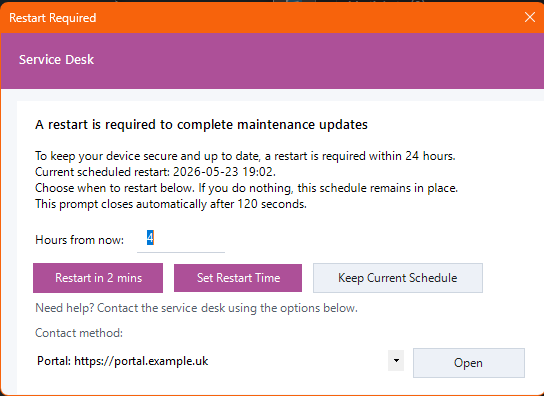
Threshold Exceeded, schedules an enforced reboot deadline, and attempts user interaction. - If interactive UX is available, the user can:
- reboot in about 2 minutes
- schedule an earlier reboot in X hours
- keep the default deadline
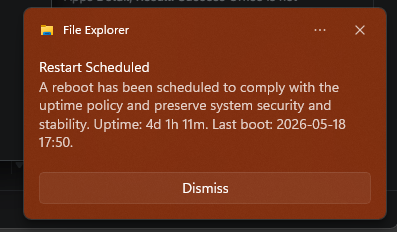
- Displays a toast showing uptime and reboot deadline details.
- Writes action/policy fields back to NinjaOne for reporting and monitor logic.
Recommended Deployment Pattern
A reliable deployment pattern is:
- Schedule this script daily on Windows devices
- Start with the default threshold/deadline (
7days /24hours) - Create a monitor or dashboard using
uptimeRebootPolicyState - Tune threshold by device role (for example, stricter on user endpoints)
For staged rollout, run with dryRun=true first so you can validate logs and field updates without actually creating or removing tasks.
Cleanup Mode
If you need to roll back or clear existing deadline tasks, set:
runMode = CleanupOnly
That mode removes the reboot deadline task and exits cleanly.
Notes
The script can attempt to install the RunAsUser module when needed for user-context prompts/toasts. In tightly locked-down environments, test this behavior with dryRun=true first and pre-stage dependencies if required.
If your support links are configured, the interactive prompt can expose quick contact options (portal/email/phone) directly from the reboot scheduling UI.